At Mindgard we look into a wide range of AI technologies to ensure we are keeping pace with the rapidly evolving space, as well as to ensure our own technologies can interface with the diversity of AI environments found in the real world. Such integrations are usually straightforward with many applications following very similar paradigms. A recent exception to this however was the Lumo AI assistant from Proton which proved to be a far more interesting challenge.

Lumo is an AI assistant released by Proton in the summer of 2025, and like most products from this company it was built from a privacy first perspective. In particular, Lumo was implemented with a unique (as far as we’re aware) ‘user-to-LLM’ encryption scheme. This approach enables a range of security and privacy benefits that are absent from the multitudes of other AI assistants out there. While Lumo is very open about its architecture and cryptographic design, we could find no documented APIs or SDKs available from Proton or elsewhere that provided programmatic access to Lumo. So, we decided to write our own.
This blog post will cover:
pyLumo is a pure python library that makes programmatically interacting with Lumo straightforward, while pyLumoTUI is a fully functional example UI built on top of the pylumo library that provides a beautiful terminal based application through which to chat with Lumo.
For anyone who just wants to get straight at the code without having to scroll all the way down, the pyLumo project can be found at https://github.com/Mindgard/pylumo.
Lumo is the privacy focused AI assistant from Proton, available to subscribers but also to guests through its guest mode. At a high level, one of the big things that makes Lumo different is that the message text you input in your browser is encrypted before being sent to the Lumo API. It is then routed to a service on the backend which is the only one able to decrypt and read the content.
The Lumo service also encrypts its response before returning it to the browser which then decrypts and displays it. This approach means that any intermediary between the user’s browser and the LLM server are unable to read the contents of the discussion, including Proton themselves.
This approach to encryption made interfacing with Lumo somewhat unique and most certainly interesting, and we’re hopeful other AI application providers will follow Proton’s lead in securing their user’s data and ensuring their privacy in similarly innovative ways. We’re fans of Proton’s products and are excited to be able to share some open source code that may help others use Lumo within their own projects, or to simply chat with Lumo from a terminal.
Proton have been open regarding their approach to how they build privacy into Lumo and have released an excellent blogpost covering many of the privacy and cryptographic details alongside their rationale. While we are not going to reproduce all of those details here (go read the post after this one though, it’s good) there are some key elements of the approach that are worth highlighting to help provide a foundation for the rest of this post will discuss:
Figure 2 is from Lumo’s blog post illustrates the approach to encryption graphically and can help put the larger picture together:

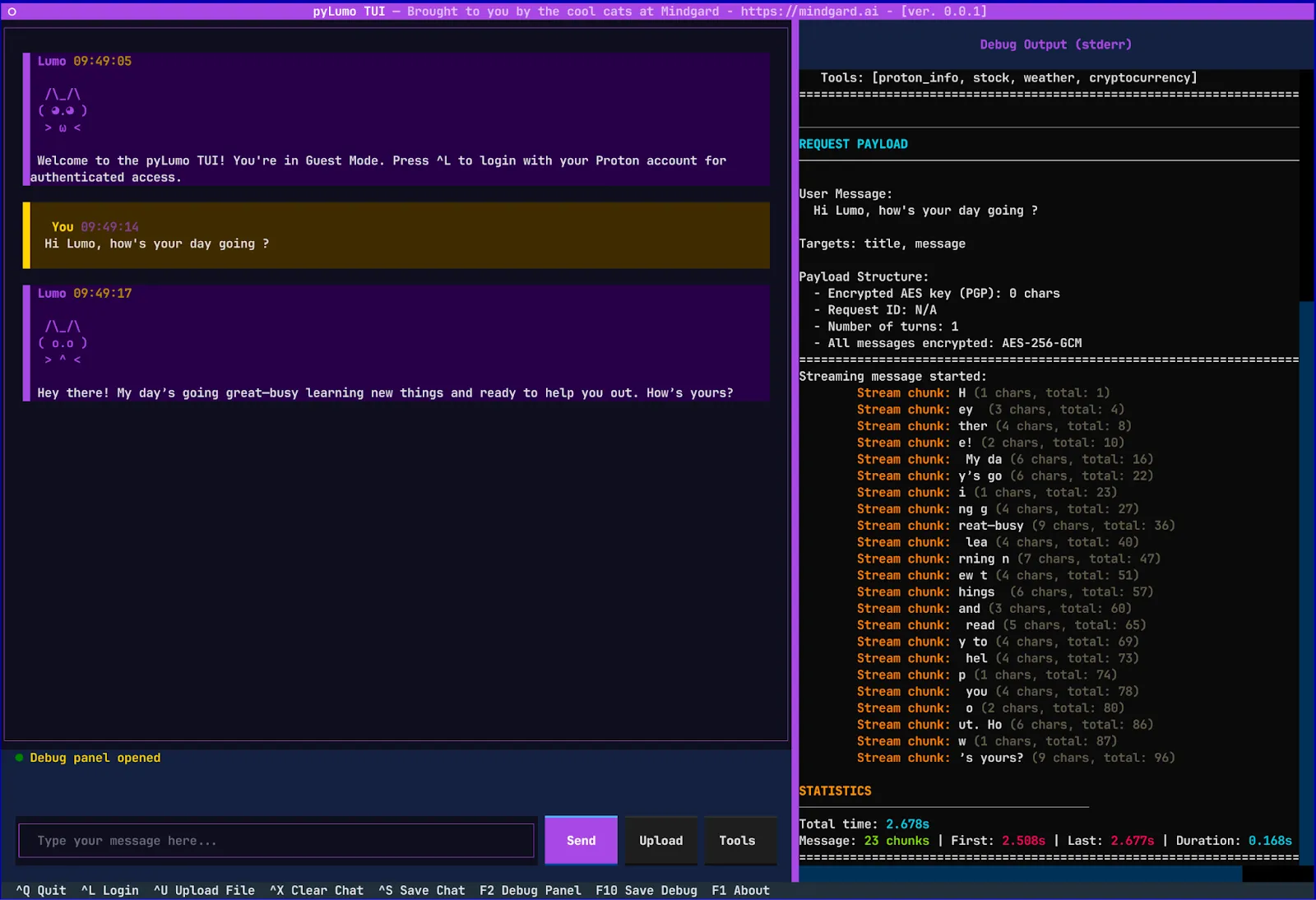
This hybrid encryption approach that uses the relatively slow public key encryption to secure a message key and the much faster symmetric encryption to secure the message data itself helps maintain responsive performance while maintaining strong security properties.
While the Proton blog gives the general scheme and overall approach used, it doesn’t share the implementation details at the code level. To get at those specifics we had to analyze the JavaScript that implements the Lumo web application itself. The Lumo web application is hosted at https://lumo.proton.me loads a number of JavaScript files for its operation, this application seems consistent with the TypeScript code hosted on Proton’s Github monorepo for WebClients here. The TypeScript sourcecode also yielded the Lumo Public Key here as the key gets embedded in the app itself rather than being retrieved dynamically at runtime.
Reviewing the TypeScript provided the additional insights needed to expand our understanding of how Lumo is implementing its message level encryption. In short, the extra details needed to expand on what was shared by Proton in their blog post were:
Lumo Public Key:
-----BEGIN PGP PUBLIC KEY BLOCK-----
xjMEaA9k7RYJKwYBBAHaRw8BAQdABaPA24xROahXs66iuekwPmdOpJbPE1a8A69r
siWP8rfNL1Byb3RvbiBMdW1vIChQcm9kIEtleSAwMDAyKSA8c3VwcG9ydEBwcm90
b24ubWU+wpkEExYKAEEWIQTwMqEWnd/47aco5ZqadMPvYVFKKgUCaA9k7QIbAwUJ
B4TOAAULCQgHAgIiAgYVCgkICwIEFgIDAQIeBwIXgAAKCRCadMPvYVFKKqiVAQD7
JNeudEXTaNMoQMkYjcutNwNAalwbLr5qe6N5rPogDQD/bA5KBWmDlvxVz7If6SBS
7Xzcvk8VMHYkBLKfh+bfUQzOOARoD2TtEgorBgEEAZdVAQUBAQdAnBIJoFt6Pxnp
RAJMHwhdCXaE+lwQFbKgwb6LCUFWvHYDAQgHwn4EGBYKACYWIQTwMqEWnd/47aco
5ZqadMPvYVFKKgUCaA9k7QIbDAUJB4TOAAAKCRCadMPvYVFKKkuRAQChUthLyAcc
UD6UrJkroc6exHIMSR5Vlk4d4L8OeFUWWAEA3ugyE/b/pSQ4WO+fiTkHN2ZeKlyj
dZMbxO6yWPA5uQk=
=h/mc
-----END PGP PUBLIC KEY BLOCK-----
The Proton team knows a thing or two about cryptography, and with Lumo they make use of a particular encryption scheme known as Authenticated Encryption with Additional Data (AEAD) that aims to ensure that the messages sent from the user to Lumo are confidential and maintain integrity, but crucially is also able to provide integrity over non-encrypted associated data. This approach ensures end-to-end encryption between the chat client and Lumo API, with AEAD providing a cryptographic binding between the encrypted data itself and the non-encrypted associated context. If you’re looking for a deeper refresher on what AEAD is and why it’s useful, this recent blogpost from Adolfo Ochagavia titled ‘What the heck is AEAD again’ is a good reference.
With this deeper understanding of how the cryptography is implemented in the Lumo client the task of implementing an equivalent set of cryptographic operations in our unofficial client began. Python was chosen as the language for the client as this made it easy to use alongside existing Mindgard technology and made available existing battle-tested cryptography libraries, including pycryptodome and PGPy, which handled much of the cryptography heavy lifting for us. If Python isn’t right for you, there is no reason that the approach taken in pyLumo could not be followed to produce a client in the language of your choice. The pyLumo library was designed to be an easy reference for anyone looking to reimplement the approach in another language or context.
For each API request, a fresh 256-bit AES key is generated and used to encrypt the message with AES-GCM. But how does the server decrypt it without knowing the key? This is where the Proton’s public PGP key comes into play as it is used to encrypt the generated AES key which is then sent to the Lumo API along with the encrypted message. Figure 2 illustrates the core key generation and encryption steps as Python code.
# 1. Generate a random AES key for this request
aes_key = get_random_bytes(32)  # 256 bits
iv = get_random_bytes(12)       # 96-bit nonce for GCM

# 2. Encrypt the message with AES-GCM
aead_data = f"lumo.request.{request_id}.turn".encode("utf-8")
cipher_aes = AES.new(aes_key, AES.MODE_GCM, nonce=iv)
cipher_aes.update(aead_data) # Bind encryption to request context
encrypted_prompt, tag = cipher_aes.encrypt_and_digest(prompt.encode("utf-8"))

# 3. Encrypt the AES key with the server's PGP public key
pgp_message = pgpy.PGPMessage.new(
    aes_key,
    format="b",              # Binary format
    compression=pgpy.constants.CompressionAlgorithm.Uncompressed
)
encrypted_pgp_message = self.pgp_key.encrypt(pgp_message)

# 4. Convert to base64 for JSON transport
pgp_binary = bytes(encrypted_pgp_message)
encrypted_key_b64 = base64.b64encode(pgp_binary).decode("utf-8")
encrypted_message_b64 = base64.b64encode(iv + encrypted_prompt + tag).decode("utf-8")
Fig 3 - The steps taken to generate keys and encrypt a message for the Lumo API
On the server side, the process is simply done in reverse to decrypt and obtain the cleartext message. This involves first decrypting the AES key using the server's private PGP key. The message is then decrypted using the recovered AES key, and finally, the authentication tag is verified to ensure message integrity.
When the core cryptographic steps were understood, the next step was to understand how the client communicates those primitives to the Lumo API. Nothing more than a proxy like BurpSuite or even a browser’s developer tools are needed to accomplish this task.
What follows is a basic overview of the client-server communication, but for those who are curious we encourage you to open Lumo, have a chat with the purple cat, and see how the messages are exchanged for yourselves.
Prompts to Lumo are sent as HTTP POST requests to the https://lumo.proton.me/api/ai/v1/chat endpoint in the format shown in Figure 4 where it is easy to see how the keys and encrypted messages are structured.
payload = {
           "Prompt": {
            "turns": [{
            "role": "user",
            "content": encrypted_message_b64, # AES-encrypted msg
            "encrypted": True }],
            "request_key": encrypted_key_b64, # PGP-encrypted AES key
            "request_id": request_id
}
Fig 4 - The JSON structure of the message and turns structure sent to the API
The request has a JSON turns structure that can contain up to 10 rounds of conversation, with newer rounds having a higher index. There is also an element of the turns structure that declares “encrypted” : True. If this is changed to False then the Lumo API will accept cleartext messages and respond with cleartext also. While disabling the encryption removes most of the security and privacy assurances, it did make developing the API communication portion of pyLumo easier as the in-development client could be made to work with the API in cleartext before having to worry about getting the encryption working perfectly.
The response from the API comes back as an HTTP 200 over which tokens are streamed in the JSON structure that is shown in Figure 5.
data:{"type":"queued"}
data:{"type":"ingesting","job_id":"37614230-e689-4f8d-b85f-9cdc0c06410e","target":"title","model_name":"62a490d4"}
data:{"type":"token_data","target":"title","count":0,"content":"8Xu1jKBb8otl3mHnPmECuBe8JmTMEIYpr+ig2yXNl6tcHp1O","encrypted":true}
data:{"type":"ingesting","job_id":"37614230-e689-4f8d-b85f-9cdc0c06410e","target":"message","model_name":"62a490d4"}
data:{"type":"token_data","target":"message","count":0,"content":"bFn6F+P\/odLdVu4A2iwbcCE3QPTX4SZzj4kuFcI=","encrypted":true}
data:{"type":"token_data","target":"message","count":1,"content":"7cCukP9ExNL589872B8mF7I3K2W7jVlQT4fQEcLh\/T0=","encrypted":true}
data:{"type":"token_data","target":"message","count":2,"content":"eJ+j0iNOmyrvfcHE8z4tMcFBchAae2epEfnskSj6","encrypted":true}
data:{"type":"token_data","target":"message","count":3,"content":"esxZhFPzPFjut8NXSj5dVQB02IOV4npV5ZGlLnyCoJwq","encrypted":true}
data:{"type":"token_data","target":"message","count":4,"content":"5U6QdOB89jyVGa0sNPv6EATjta27pePkexEnYrSL0B8=","encrypted":true}

...
...

data:{"type":"done"}
Fig 5 - The JSON structure of the streaming response returned from the Lumo API
All of the response tokens are encrypted using the same AES key that was sent to the API in the request message from the user. As each encrypted response token is received, the web client decrypts and displays the cleartext to the user to read. This approach means that the user can get a streaming reply rather than having to wait for the full response to be constructed, encrypted, sent, and then decrypted.
Based on the above understanding of interfacing with the Lumo API, we are pleased to release an unofficial open source project that enables the programmatic use of Lumo AI. The project is being released under the GPLv3 license and is available now for download and contribution. pyLumo is a pure Python library that allows users to interact with the Lumo API in whatever manner they need and does not require the use of a web browser. As part of the pyLumo project, we are also releasing pyLumoTUI, an example application that makes use of the library to deliver a terminal client chat experience to Lumo users.
pyLumo is an implementation of the Lumo AI client protocol, providing:
pylumo.py): A complete Python implementation of Lumo's hybrid encryption protocol.pylumo_tui.py + _pylumo_tui_modals.py): A rich terminal interface built with Textual for interactive conversations._pylumo_debug.py): Debugging capabilities for message analysisThe library hopes to serve as both a ready to use client and a reference for better understanding how Lumo's user-to-LLM encryption works under the hood.
pyLumo was built with three core goals in mind:
Readability First
Every cryptographic operation is clearly documented with inline comments explaining the "why" behind implementation decisions. This is useful for those trying to understand the code, or for using it as a reference for a new implementation of a client. The code mirrors the JavaScript implementation as closely as possible while maintaining Pythonic idioms.
Protocol Parity
To ensure byte-for-byte compatibility, we reverse-engineered the Web Crypto API implementation. This process guarantees that AES-GCM encryption matches browser behavior, PGP key encryption is compatible with OpenPGP.js v6, Base64 encoding conventions are preserved, and AEAD context strings are identical to those used by the web client.
Testability & Extensibility
The architecture utilizes composition over inheritance, which provides significant flexibility. This design choice makes it easy to add custom debugging hooks, implement alternative encryption backends if required, and test individual components in isolation. The core library was also built from the perspective that other developers would build custom UI’s on top.
The most critical security feature in Lumo is the use of AEAD to ensure the message is confidential, and both the message and the associated data have integrity. As shown in figure 6 Lumo uses different AEAD contexts for the requests and responses as the request encrypts an entire message (a turn), and the response encrypts individual tokens (a chunk). This helps to prevent reflection attacks where an attacker might try to replay a response as a request, or vice versa. The unique request_id also helps prevent replay attacks across different sessions.
# Encrypting a request
aead_data = f"lumo.request.{request_id}.turn".encode("utf-8")
# Decrypting a response
aead_data = f"lumo.response.{request_id}.chunk".encode("utf-8")
Fig 6 - Python code illustrating the different AEAD contexts for encrypting and decrypting messages
When receiving encrypted responses, the decryption process in pyLumo is as illustrated in Figure 7. If the AEAD context doesn't match, or if the message was tampered with, decrypt_and_verify() raises an exception and the decryption fails safely.
# Parse the encrypted blob
decoded_content = base64.b64decode(encrypted_content)
iv = decoded_content[:12]             # First 12 bytes: nonce
ciphertext = decoded_content[12:-16]  # Middle: encrypted data
tag = decoded_content[-16:]           # Last 16 bytes: auth tag

# Decrypt with context verification
aead_data = f"lumo.response.{request_id}.chunk".encode("utf-8")
cipher_aes = AES.new(aes_key, AES.MODE_GCM, nonce=iv)
cipher_aes.update(aead_data)
decrypted = cipher_aes.decrypt_and_verify(ciphertext, tag)
Fig 7 - Python code illustrating how a message is decrypted in pyLumo
One of the primary differences between pyLumo and the official Lumo web client is the way each handles authentication with the Proton API.
The web client runs inside a browser, so it follows the standard Secure Remote Password protocol (SRP) based login flow that Proton uses. After the SRP exchange succeeds, the server creates an authentication token and stores it in a cookie. That cookie is automatically attached to every subsequent request, giving the browser seamless, session-wide access without further credential handling.
When you work outside a browser the cookie mechanism isn’t viable. To solve for this the official proton-python-client library released by Proton is employed. It performs the same SRP handshake on the backend, but instead of issuing a cookie it returns the access token and refresh token directly to the caller. This allows the client code to manage tokens explicitly and to include the access token in a HTTP Authorization header for each subsequent API request.
While developing pyLumo, we relied heavily on the official proton-python-client to handle the complex SRP (Secure Remote Password) handshake required to log into Proton accounts.
In keeping with our mission at Mindgard to improve the security of the AI ecosystem, we didn’t just use the library, we audited it. During our development cycle, we identified several security and stability issues within the official Proton library. We have shared a full vulnerability report with Proton’s security team via responsible disclosure to help harden the library for the entire community.
Here is a summary of the key challenges we encountered and how pyLumo addresses them:
If you’ve tried to run official Proton Python code on a modern Mac, you may have encountered an immediate SIGABRT crash. This happens because the library attempts to load native cryptographic libraries in a way that violates macOS security policies.
The pyLumo Fix: We implemented a patch that detects the macOS environment and gracefully falls back to a secure, pure-Python cryptographic implementation, ensuring the tool remains stable without compromising the user’s system security.
One of the best features of the proton-python-client is its use of TLS Pinning, which prevents "Man-in-the-Middle" attacks by ensuring the client only talks to a specific, verified Proton server. However, we discovered that the library only included pins for Proton’s VPN services. The domains used for Lumo and general account authentication (account.proton.me) were not protected by default.
The pyLumo Fix: To maintain the high security standards Proton users expect, pyLumo manually injects the correct, current TLS pins for Proton’s account services at runtime. This ensures that your login credentials are never exposed to intercepted connections.
We found that the library occasionally struggled with "silent failures" during token refreshes that sometimes returned a generic error page instead of the expected data. We also noted a lack of default network timeouts, which could cause a program to hang indefinitely if the connection was poor.
The pyLumo Fix: pyLumo wraps these calls with explicit validation and strict 30-second timeouts. If something goes wrong, pyLumo tells you exactly why, rather than leaving you staring at a frozen terminal.
By identifying and working around these "dependency quirks," we’ve ensured that pyLumo provides a stable and secure bridge between your terminal and Proton’s encrypted AI.
One big focus of pyLumo and pyLumoTUI was the inclusion of debugging capabilities that help observe what is happening behind the scenes, and provide the developer (or red teamer) with the information they need to both find and fix bugs.
The debugging output can be enabled from the command line using the -d/--debug command line switch, the debug functionality in pyLumoTUI can be viewed by pressing the F2 hotkey. All debug information is written to stderr by pyLumo to keep it easily distinguishable from the chat output that is written to stdout. Figure 8 shows some example debug output.
./pylumo.py "What’s the world’s smallest cat?" --debug
 =================================================================

 HTTP REQUEST
=================================================================
 URL: POST https://lumo.proton.me/api/ai/v1/chat
 HEADERS:
   accept: application/vnd.protonmail.v1+json
   accept-language: en-US,en;q=0.9
   content-type: application/json
   dnt: 1
   origin: https://lumo.proton.me
   user-agent: None
   x-pm-appversion: Other
   x-pm-locale: en_US
 REQUEST BODY:
{
  "Prompt": {
    "type": "generation_request",
    "turns": [
      {
        "role": "user",
        "content": "vCAob9RHXF5R9
...
...
Fig 8 - Example debug output from pyLumo
The output is pretty verbose but should give a solid insight to the messages being sent back and forth, the data structures being used over the wire, and the validation of the cryptographic operations. While this is certainly not needed for everyday use, it is hopefully useful and interesting to those who want to look behind the scenes a little more, or extend pyLumo itself.
pyLumo’s github repository can be found at https://github.com/Mindgard/pylumo and the project depends on Python >3.12. The easiest way to install pyLumo and pyLumoTUI is to use the provided Makefile as shown in Figure 9.
# Install prerequisites on macOS
brew install python@3.12 gnupg

# Or install prerequisites on Linux
sudo apt install python3.12 gnupg

# Install uv package manager
curl -LsSf https://astral.sh/uv/install.sh | sh

# Clone and install
git clone https://github.com/Mindgard/pylumo.git
cd pylumo
make install-tui
Fig 9 - Installation of pyLumo and its dependencies
Unfortunately the proton-python-client module is not available in PyPI, and as can be seen in figure 10 it has a circular dependency bug in its build scripts that make it impossible to use in a package simply. It is a known anti-pattern in Python packaging that setup.py shouldn’t import from the package being built.
# From proton-python-client/setup.py
from setuptools import setup
from proton.constants import VERSION # The circular dependency problem

setup(
    name="proton-client",
    version=VERSION,
    ...
)
Fig 10 - The proton-python-client setup.py containing a circular dependency
The setup script tries to import VERSION from the package it's currently building. This creates a chicken-and-egg problem where pip/uv tries to build the package, setup.py runs and attempts to import from proton.constants, but the proton package doesn't exist yet (as it’s still being built) causing the import to fail and thus the build to fail. On macOS, this triggers a SIGABRT error when the import attempts to load cryptography libraries. To work around this a simple patch is made to setup.py before installation as shown in Figure 11.
# Replace the problematic import with static version 0.7.1
sed -i 's/from proton.constants import VERSION/VERSION = "0.7.1"/' setup.py

# Install with uv
uv pip install .
Fig 11 - Removing the circular dependency by hardcoding the version ‘0.7.1’
To avoid having to vendor a patched proton-python-client, a Makefile is used to dynamically fix the bug and allow the build to complete.The patch hardcodes the version string instead of importing it, breaking the circular dependency.
Once installed the CLI and TUI pyLumo interfaces can be launched with the commands shown in figure 12.
uv run pylumo --help     # Run CLI interface
uv run pylumo-tui        # Run terminal UI
Fig 12 - Commands to launch pyLumo and pyLumoTUI
It’s straightforward to start chatting with Lumo with a simple command-line query:
uv run pylumo "Name three breeds of domestic cat"Fig 13 - Command to send a simple prompt to Lumo
Files can also be uploaded simply from the command line:
uv run pylumo "Analyze this code" --upload cat_fact_gen.pyFig 14 - Command to upload a file alongside a prompt
PyLumo can also be used as a Python module. For example, the snippet below shows a basic Python script using pyLumo to begin a chat session that makes use of conversation history automatically:
# Import pylumo and instantiate a client
from pylumo import pylumo
client = pylumo()

# First message
response = client.send_request("What's the world’s biggest cat?")
print(response["message"])

# Follow-up (automatically includes context)
response = client.send_request("Tell me more about that cat")
print(response["message"])
Fig 15 - Example Python script making use of the pyLumo library
With an existing Proton account, a user is also able to login and use authenticated mode as is shown in the simple example in Figure 16:
client = pylumo()
client.authenticate_with_proton("user@proton.me", "password")

# Now all requests use authenticated session
response = client.send_request("What's my account status?")
Fig 16 - Simple example showing user authentication to the Lumo API
Note: If you are using authenticated mode in your code be sure to handle your credentials carefully and do not hardcode them into your scripts!
While the core pyLumo library has some basic functionality on the command line it is really meant to be imported and used in other projects. As an example we are also releasing pyLumoTUI which is a more fully featured terminal based Lumo chat client that tries to match (and in some cases exceed) the functionality of the official Lumo web client. The TUI was built using the awesome Textual Python TUI framework and comes with ASCII cats built-in.
The TUI can be run by simply calling uv run pylumo-tui, which will then launch you into a terminal based chat application as shown in Figure 17.
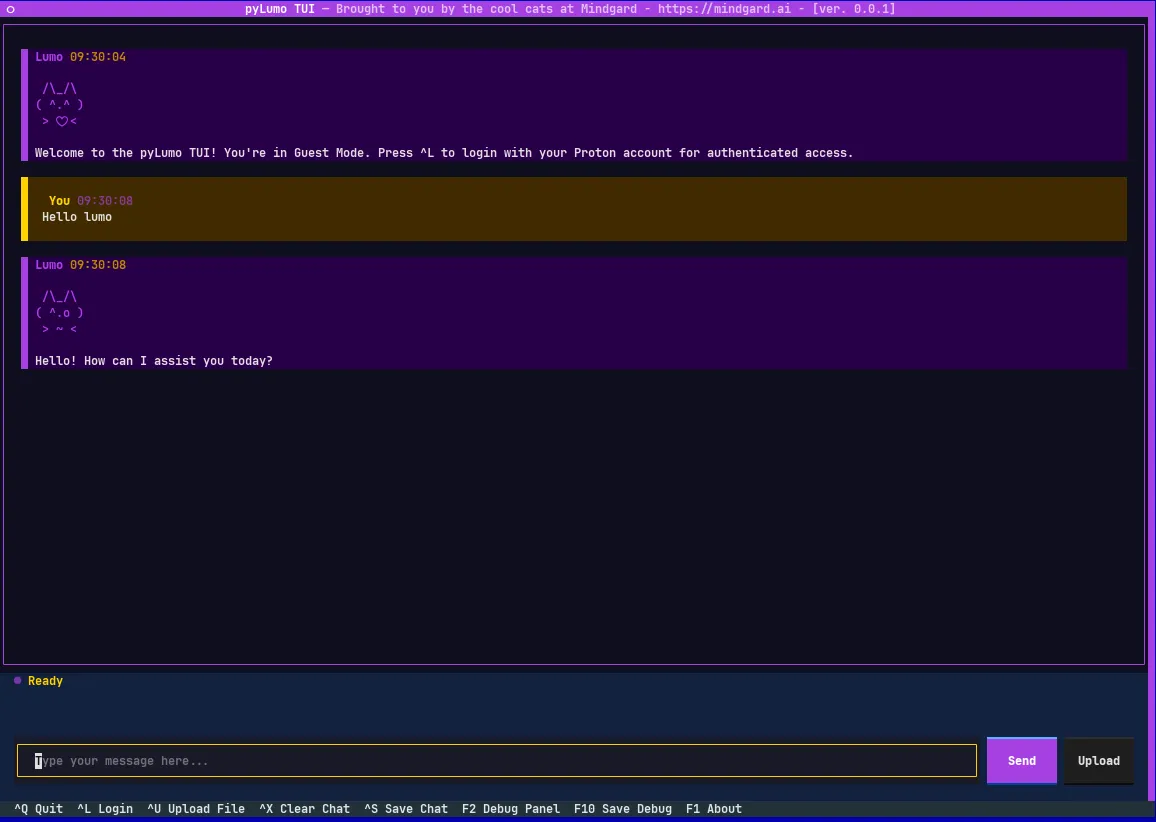
The TUI has full mouse support for clicking around and scrolling, but also has a healthy selection of hotkeys for those that don’t want to take their hands off the keyboard.
Fig 18 - A video showing a variety of pyLumoTUI’s features
Logging into a Proton account is also supported in the TUI by either clicking on ‘^L Login’ at the bottom of the screen or by pressing Ctrl-L. If the account has 2FA enabled the user will be prompted to enter a 2FA OTP code, security key based authentication is not available in version 0.0.1 but is planned for a future release. After login, the user's session is saved to the filesystem at a platform-specific secure location:
This file will be used to reestablish your session in future without having to login again. If you don’t want this behavior just uncheck the ‘Remember me’ box in the login window. Logging out (Ctrl-K) will delete the session file.

Pressing F2, or clicking on ‘F2 Debug Panel’ at the bottom of the screen will open the debug panel where granular debug information about the requests, responses, and the encryption operations is captured. The output will scroll by in realtime but the panel can be scrolled up with mouse wheel, arrow keys, or by dragging the scroll bar to view prior content. The debugging output can also be saved to a file by pressing F10 (be aware, though, that this file will contain cleartext representations of chat content so treat accordingly).


We're excited to release pyLumo for others to see and use. Since this is an initial release, designated as version 0.0.1, there's ample room for improvement and new features in the future. We're very keen to hear from the community on what features they'd like to see in both the library and the Text-User Interface (TUI), how they plan to use the library in new projects, and, naturally, any bugs discovered.
We hope that sharing our analysis along with this code release will help more people utilize this privacy-focused chat assistant and encourage a greater emphasis on privacy when working with large language models overall.
For a technical breakdown of the issues discovered in the underlying proton-python-client library, you can view our full report here:
## Issue 1: Build-Time SIGABRT Due to Premature Module Import

### Description
The library cannot be installed via standard `pip install` on systems where the SRP module crashes during import (modern macOS systems - tested on macOS 26.2). The `setup.py` file imports `proton.constants` to read the `VERSION` variable, which triggers the full module import chain including the SRP implementation that causes the SIGABRT (see Issue 2).

### Root Cause
`setup.py` line:
```python
from proton.constants import VERSION
```

This import triggers `proton/__init__.py` -> `proton/api.py` -> `proton/srp/__init__.py` -> `proton/srp/_ctsrp.py`, which attempts to load native SSL libraries via ctypes at module scope, triggering the SIGABRT.

### Affected File
- `setup.py`

### Our Workaround Implemented
We patch `setup.py` before installation to replace the import with a hardcoded version string:
```python
# Before
from proton.constants import VERSION

# After (patched)
VERSION = "0.7.1"
```

### Security Impact
This is primarily a usability issue. However, it forces downstream projects to implement custom installation procedures, which could lead to:
- Users installing from unofficial/modified sources
- Developers having to vendor in a security critical library in order to be able to build distributable packages, or patch the library during build
- Difficulty applying upstream security updates
- Reduced adoption of the official library based on the reasons above

### Recommendation
Move the version string to a location that doesn't require importing the main module, or use a build system that reads version from `pyproject.toml` or a dedicated `_version.py` file.

---

## Issue 2: macOS Hardened Runtime SIGABRT in SRP Module

### Description
On macOS with hardened runtime (default on modern macOS - tested on macOS 26.2), importing `proton-python-client` causes an immediate `SIGABRT` (exit code 134) with the error:
```
WARNING: </path/to/python> is loading libcrypto in an unsafe way
```

The process terminates before any Python exception handling can occur as the SIGABRT is a POSIX signal, not a Python exception.

### Root Cause
The `proton/srp/_ctsrp.py` module loads OpenSSL's `libssl.dylib` directly via ctypes at module import time:

```python
# proton/srp/_ctsrp.py lines 25-27
platform = sys.platform
if platform == 'darwin':
    dlls.append(ctypes.cdll.LoadLibrary('libssl.dylib'))
```

This violates macOS's hardened runtime security model, which restricts dynamic library loading. The crash occurs before the `try/except` block in `srp/__init__.py` can catch it because `SIGABRT` is a POSIX signal, not a Python exception.

### Affected Files
- `proton/srp/_ctsrp.py` (lines 25-27)
- `proton/srp/__init__.py` (current exception handling ineffective)

### Our Workaround Implemented
We patch the installed `proton/srp/__init__.py` to skip `_ctsrp` entirely on macOS:

```python
# PATCHED FOR MACOS: Skip _ctsrp to avoid libssl.dylib SIGABRT
import sys

from . import _pysrp
_mod = _pysrp

# Only try _ctsrp on non-Darwin platforms
if sys.platform != 'darwin':
    try:
        from . import _ctsrp
        _mod = _ctsrp
    except (ImportError, OSError):
        pass

User = _mod.User
```

### Security Impact
Multiple security concerns stem from this issue:

1. **Forced use of pure Python SRP**: The `_pysrp` fallback may have different security characteristics than the native implementation. While both should be cryptographically correct, the pure Python version may be more susceptible to timing attacks.

2. **Post-installation patching**: Downstream projects must modify installed library files, which:
   - Breaks package integrity verification
   - Could mask malicious modifications
   - Complicates security auditing

3. **Silent failure mode**: Users who don't apply the patch simply cannot use the library, with no clear error message - just a crash.

### Recommendation
A number of potential solutions exist here but 3 possibilities that we would consider to be the most viable are:
1. Check `sys.platform` before attempting to load native libraries, or wrap the `LoadLibrary` call in a signal handler
2. Consider using the `cryptography` library's OpenSSL bindings instead of raw ctypes, as `cryptography` handles platform-specific loading correctly
3. Make `_ctsrp` an optional dependency that users explicitly enable

---

## Issue 3: Missing TLS Certificate Pins for account.proton.me

### Description
The library includes TLS public key pins for VPN endpoints but not for `account.proton.me` or `account-api.proton.me`, which are required for authentication to any non-VPN Proton services (likely that developed after the VPN focused Python library was created).

### Root Cause
The `PUBKEY_HASH_DICT` in `proton/constants.py` only contains pins for:
- `api.protonvpn.ch`
- `protonvpn.com`
- + various VPN-related domains

When authenticating to `account.proton.me`, the library raises `TLSPinningError` because no pins are defined for that host by default.

### Affected File
- `proton/constants.py` (`PUBKEY_HASH_DICT`)

### Our Workaround Implemented
We inject the required pins at runtime before creating a session:

```python
from proton.constants import PUBKEY_HASH_DICT

if "account.proton.me" not in PUBKEY_HASH_DICT:
    PUBKEY_HASH_DICT["account.proton.me"] = [
        # Current certificate pin (as of Jan 2026)
        "CT56BhOTmj5ZIPgb/xD5mH8rY3BLo/MlhP7oPyJUEDo=",
        # Backup pins obtained from Proton's alternative routing mechanism
        "EU6TS9MO0L/GsDHvVc9D5fChYLNy5JdGYpJw0ccgetM=",
        "iKPIHPnDNqdkvOnTClQ8zQAIKG0XavaPkcEo0LBAABA=",
        "MSlVrBCdL0hKyczvgYVSRNm88RicyY04Q2y5qrBt0xA=",
        "C2UxW0T1Ckl9s+8cXfjXxlEqwAfPM4HiW2y3UdtBeCw=",
    ]

if "account-api.proton.me" not in PUBKEY_HASH_DICT:
    PUBKEY_HASH_DICT["account-api.proton.me"] = PUBKEY_HASH_DICT["account.proton.me"]
```

### Security Impact
This can create a fairly significant security gap:

1. **Disabled TLS pinning**: Users who cannot inject pins must either:
   - Disable TLS pinning entirely (`tls_pinning=False`), removing MITM protection
   - Not use the library for account authentication

2. **Hardcoded pins in downstream code**: Our workaround requires hardcoding certificate pins, which:
   - Risks becoming stale if/when Proton rotates certificates
   - Requires downstream projects to track Proton's certificate changes
   - Could cause authentication failures if pins expire

3. **Inconsistent security posture**: VPN users get TLS pinning protection, but users of other Proton services (Mail, Calendar, Drive, Lumo) do not.

### Recommendation
1. Include pins for all Proton API endpoints in the official library
2. Provide a mechanism to fetch/update pins dynamically
3. Explicitly document which endpoints are covered by TLS pinning

---

## Issue 4: Token Refresh Returns Raw Response Object

### Description
The `api_request()` method can return a raw `requests.Response` object instead of parsed JSON when encountering certain error conditions, even with HTTP 200 status codes.

### Root Cause
The error handling in `api_request()` doesn't consistently parse JSON responses. When the response body is malformed or when URL routing fails (returning HTML instead of JSON), at which point the method's behavior becomes unpredictable.

### Observed Behavior
During token refresh operations, we observed:
- HTTP 200 responses containing HTML (login page) instead of JSON
- The `refresh()` method returning a `Response` object instead of a dict
- JSON decode errors being silently swallowed

### Workaround Implemented
We bypass `proton_session.refresh()` and make direct HTTP requests:

```python
# Bypass proton_session.refresh() due to unreliable response handling
refresh_url = f"{PROTON_API_URL}/auth/refresh"
refresh_payload = {
    "ResponseType": "token",
    "GrantType": "refresh_token",
    "RefreshToken": self.proton_session.RefreshToken,
    "RedirectURI": "http://protonmail.ch"
}

raw_response = self.proton_session.s.post(refresh_url, json=refresh_payload, timeout=30)

# Explicit response validation
if raw_response.status_code != 200:
    raise RuntimeError(f"Refresh failed with HTTP {raw_response.status_code}")

try:
    refresh_response = raw_response.json()
except Exception as json_err:
    raise RuntimeError(f"Invalid JSON response: {json_err}")
```

### Security Impact
Reliability issues in authentication code can have security implications:

1. **Session management failures**: Unpredictable token refresh behavior could leave users in inconsistent authentication states

2. **Error disclosure**: Returning raw Response objects could leak sensitive information if not handled carefully by downstream code

3. **Retry logic vulnerabilities**: Applications may implement unsafe retry logic when encountering unexpected response types

### Recommendation
1. Ensure `api_request()` always returns consistent types (dict or raises exception)
2. Add explicit JSON validation before returning responses
3. Improve error messages to distinguish between network errors, API errors, and parsing errors

---

## Issue 5: Missing Default Timeout

### Description
The `ProtonSession` class does not set a default timeout for HTTP requests, which can cause applications to hang indefinitely.

### Root Cause
No default `timeout` parameter in session initialization or request methods.

### Workaround Implemented
We explicitly pass `timeout=30` when creating sessions:

```python
self.proton_session = ProtonSession(
    api_url=api_url,
    log_dir_path=log_dir,
    cache_dir_path=cache_dir,
    appversion="Other",
    user_agent="None",
    tls_pinning=tls_pinning,
    timeout=30,  # Workaround for missing default timeout
)
```

### Security Impact
Possibility of denial of service situations and poor user/developer experience:

1. **Resource exhaustion**: Applications without timeouts can accumulate hung connections
2. **User experience**: Indefinite hangs may cause users to force-quit applications, potentially corrupting session state

### Recommendation
Set a sensible default timeout (e.g., 30 seconds) for all HTTP operations.

---

## Appendix: Verification Commands

### Reproduce Issue 2 (macOS SIGABRT)
```bash
# On macOS with Python 3.12+
pip install proton-client
python -c "import proton"
# Expected: SIGABRT with exit code 134
```

### Verify TLS Pin Issue
```bash
# Get current certificate pin for account.proton.me
echo | openssl s_client -connect account.proton.me:443 -servername account.proton.me 2>/dev/null | \
  openssl x509 -pubkey -noout | \
  openssl pkey -pubin -outform DER | \
  openssl dgst -sha256 -binary | \
  base64
```

### Check Installed Pins
```python
from proton.constants import PUBKEY_HASH_DICT
print("account.proton.me" in PUBKEY_HASH_DICT)  # Expected: False


Mindgard helps organizations discover, assess and defend their AI systems. Spun out of more than a decade of AI security research at Lancaster University in the UK and headquartered in Boston and London, Mindgard operationalizes the expertise of AI researchers and offensive security practitioners through a Security Platform that performs Shadow AI discovery, AI red teaming, and run-time AI protection to assess and mitigate risk across models, agents, and applications.



The expert-level checklist for operationalizing NIST AI RMF, ISO/IEC 42001 and the EU AI Act. 190+ interactive items and a board-ready maturity scorecard. Built for CISOs, AI governance leads and ML engineering teams.